Ask Expensify AI anything: Charts, insights, and expense automation from anywhere

I know we're all inundated with AI hype, so let me get straight into it. Now, you can ask Expensify AI anything.
Email concierge@expensify.com, text 47777 with your US number, or just ask right in the app with any question about anything, and you'll get a real answer. Ask anything. Tell it to do anything. It just works.
Expensify AI is an AI-powered expense management assistant that lets employees and finance teams analyze spending, automate expense reports, configure workflows, and manage expenses using natural language through email, text message, or the Expensify app.
Key takeaways
- Ask Concierge AI questions by email, text 47777, or chatting in the app
- Get instant answers and charts for anything in your account, from monthly spend to a full quarterly flux analysis
- Create, categorize, tag, approve, and reject expenses using plain language, no clicking required
- Configure workspaces, build rules, and fix your own setup mistakes by just asking
- Expensify ranks AI capability on a five-level scale, and most of the industry is still stuck on level zero
Ask questions, get answers (and charts)
Ask Expensify’s AI, Concierge, anything about anything, such as:
How much do I spend per month?
When did I last go to Mr Taco?
Do a quarterly flux analysis by category, merchant, and employee
... or any request to do anything, such as:
Record a $10 Extracto Coffee expense and add Bob as an attendee
Create a rule to categorize all Mr Taco expenses as "Fine Dining"
Copy my "New Client" workspace, rename it "Mr Taco", and add bob@mrtaco.ai as an admin
... then, our Concierge AI will respond with confirmation that it did whatever you instructed it to, or a complete answer to whatever question you asked, along with a beautiful chart like this:
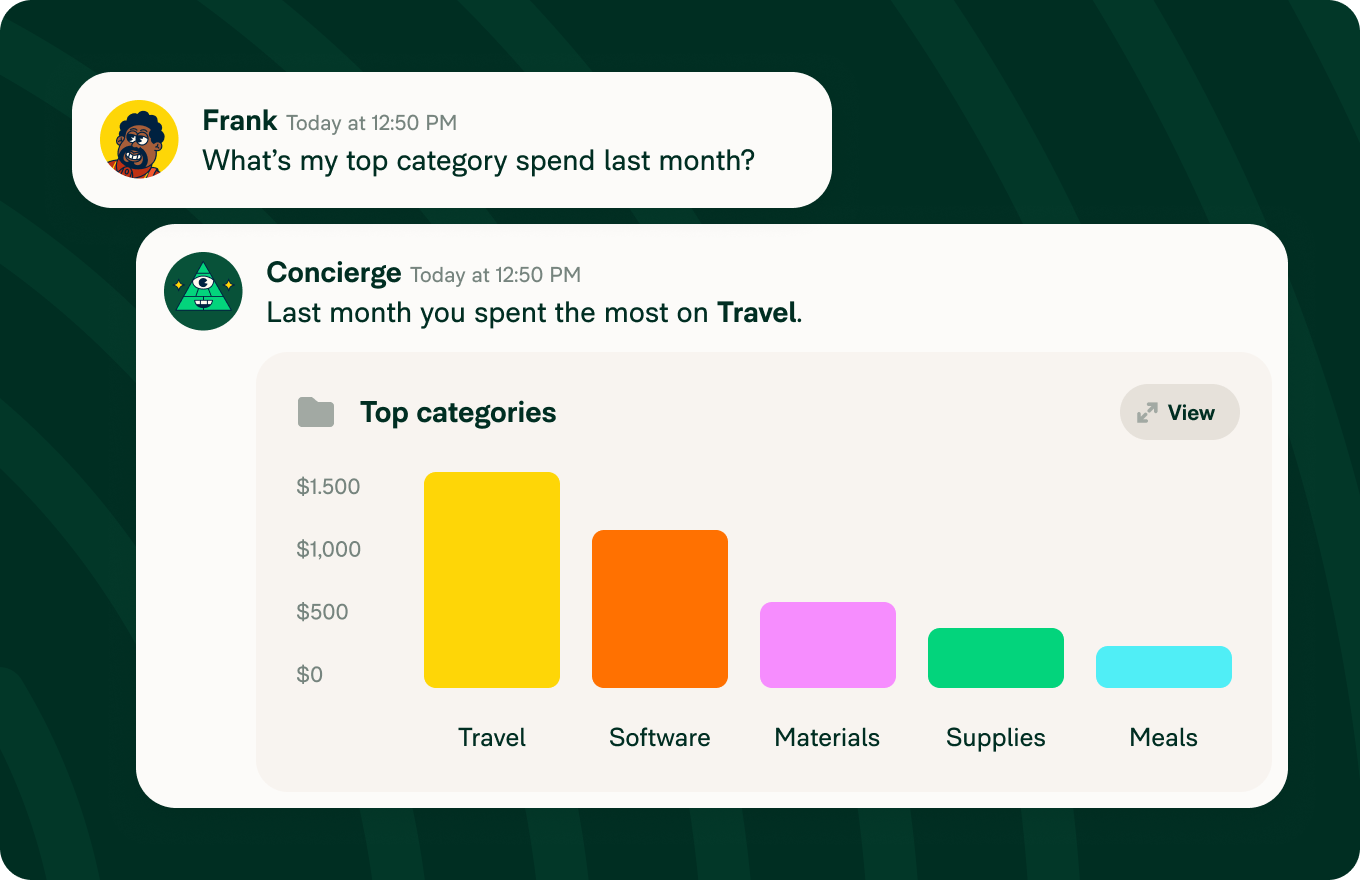
All this works through email, or texting 47777, without the need to use the app (though obviously, the app is even better, with realtime streaming responses and push notifications).
I'm pretty sure that level of deep AI integration is not just a first for expense management, but maybe a first anywhere. We've long said "every expense is a conversation," and that conversation isn't just with your team; it's increasingly with a super-intelligent AI, eager to help.
More of a visual learner? Watch this to get a sense of what you can do:
One AI, many jobs
It's hard to list out just how much a superintelligence can do for you, given that it's "pretty much everything." Here's a sense of all the ways Concierge can help you when it comes to AI-powered expense management.
Expense assistant
Create, categorize, tag, and modify expenses and reports. Submit, approve, and reject expense reports on command. Or, just sit back, do your thing, and Concierge can learn your habits and fix mistakes automatically as it sees them.
Policy enforcer
Group and submit expenses on whatever cadence you choose. Verify that enough food was ordered for that number of attendees, and make sure nobody is giving out crazy tips. Route and auto-approve or auto-reject reports based on amount, expense, submitter, moon cycle, cuisine, or truly anything you can imagine. Just say the word.
Virtual CFO
Get a series of flux analyses in your email inbox every month. Ask any question about any dimension of your data, submitter, category, tag, workspace, card, month, quarter, receipt status, export stats, anything, and get a beautiful chart.
Don't like that chart? Say why and get a better one – no clicking, coding, or customization required.
Expense IT
Concierge can not only explain what Expensify can do, but can configure it for you. Something didn't work as you expected? Don't spend hours debugging it yourself; just ask Concierge and it can diagnose the problem for you, and fix your config so it won't happen again.
What makes Expensify AI different?
Still not quite getting it when it comes to all the expanded features that Expensify can do? I don’t blame you. AI is a marketing term, not a technology, and the market has aggressively "AI-washed" traditional automation with "AI this" and "agent that," to the point where all AI starts to sound the same.
But underneath the marketing, there are some genuine technical differences happening that are important to understand. So, to help you separate the reality from the hype, let me suggest a variation of the five-level framework used to rank self-driving car capability, adapted to expense management.
Level 0: Rules and alerts ("you drive, and it gives you warnings")
This is where most of the industry is at – highly configurable tools that highlight problematic conditions and make changes using basic "if/then" rules engines. Autocorrection, traditional rules engines, and missing-receipt alerts are good examples of level 0 automation.
This kind of manually-configured automation is powerful when it works. But when you break it (and as you add more and more rules, you inevitably will), it's on you to debug and fix it.
Level 1: AI insight ("you drive, but it helps you see the road")
The first level of "real AI" (a hilariously paradoxical concept) is when you start using a general-purpose AI to analyze or transform snapshots of data, such as by copy/pasting data into a chat window, uploading a CSV, or even connecting Claude to Expensify through MCP.
This can produce impressive insights and beautiful dashboards. But it's generally a read-only experience that advises you how to do your job, meaning it's still on you to actually do the work.
Level 2: On-demand AI action ("it helps steer when you ask")
This is quickly becoming the "new baseline," where you can ask the AI to do anything you can do via the UI, and it just works. Concierge is a level 2 AI that can scan receipts, categorize expenses, approve reports, and more. It can also explain why it did it, and reconfigure the workspace and itself to do it differently next time.
Concierge and most modern "copilot" experiences live here. They’re extremely useful, but you still decide what should happen and when.
Level 3: Workflow autonomy ("it drives the workflow, but asks you to take over when needed")
AI gets really interesting when it starts to operate independently of you as a full member of a predefined workflow. Rather than you asking it to do something, it recognizes when it's supposed to do it, and does it in a way that can be audited later, but without waiting for confirmation.
This isn't a basic "deterministic" (i.e., if/then) workflow engine operating on cleanly defined transactional data. This is using "non-deterministic" (i.e., large language model) technology to evaluate unstructured natural-language conversations and documents to find patterns and make genuine judgement calls, and then collaborate using natural language with other humans or agents.
It can inspect, modify, route, and process expenses; ask employees for missing information through conversational email; chase receipts; apply exceptions; and escalate only the difficult cases. This is the jump from AI replacing clicks to AI owning a workflow. Our agent rules feature (in beta) is, I think, the first in our industry to do anything like this.
Level 4: Role autonomy ("it fully drives within a defined operating area")
At this level, it starts to get pretty wild. Rather than defining specific rules in the narrow confines of a defined workflow, you build a persistent virtual agent to operate as an extension of yourself.
Think of the most boring, repetitive parts of your job, and hand it off to a collaborative agent that serves as your virtual expense compliance manager, AP coordinator, travel administrator, close assistant, and so on.
Expensify's custom agents can collaborate through email, chat, and text; decide what work needs doing; handle routine exceptions; and maintain a complete audit trail, within defined permissions, budgets, and escalation rules. They do not just execute requests; they perform a real operational role.
Level 5: Outcome autonomy ("it drives anywhere")
This last level is admittedly a bit aspirational. Rather than "just" handing off your most boring and repetitive work, the kind of work you can do in your sleep, you give AI a high-level goal, and then step back and let it get to work. For example, rather than:
"attach this receipt image to this transaction" (level 0)
"match this folder of receipts to this CSV" (level 1)
"automatically match all uploaded receipts to this linked card feed" (level 2)
"contact everyone who needs to upload a receipt and verify it matches" (level 3)
"reconcile my corporate card feed and verify nobody is inflating attendees" (level 4)
... you give a high level assignment like:
"maintain GAAP compliant records and prevent fraud" (level 5)
"reduce close time by 30%" (level 5)
"launch a UK entity" (level 5)
... and a level 5 AI will independently figure out what work must happen, coordinate people and systems, adapt the process when circumstances change, and only come back for genuinely consequential decisions.
Expensify doesn't do this yet. But, someday...?
Human in the lead
Anyway, I know we're all overwhelmed by endless talk of AI, and are anxious about its pace and direction of development. But it's here, it's not going anywhere, and it's ready to work for us, right now.
If you've been sitting on the sidelines, Expensify AI is the easiest way to join the party. Come on in, the water's fine!
Because Expensify is committed to not merely keeping a "human in the loop," but a "human in the lead." Our AI isn't going to replace you, but it will supercharge you. Think of everything you wish you could do if you had unlimited time... and let's start there.
Expensify is your ride or die expense AI. For $5/mo.
-david
Founder and CEO of Expensify
P.S. Follow me on LinkedIn!