June 2026 Expensify product update: AI agents, Concierge upgrades, and smarter card controls

This month's updates let you ask Expensify questions from any AI tool, put more of the busywork on Concierge, and give admins tighter controls over card spend. Here's what's new.
TL;DR – What’s new in Expensify (June 2026)
- Ask questions about your expenses from ChatGPT, Claude, Cursor, and other AI tools
- Let Concierge AI manage expense rules, create and submit reports, retract reports, mark expenses as cash, and add/remove workspace members
- Set realtime approve/decline rules on Expensify Cards by merchant, category, amount, or currency
- Automatically capture the VAT amount from receipts with SmartScan
- Connect to Gusto and TriNet with new integrations
- Flag gift card and prepaid card purchases as prohibited expenses during receipt scanning
- View recent credit card transactions and expenses pending review from your Home page
- Filter faster with a fully redesigned experience across the app
- Find workspace rooms faster with a new directory
- Manage employee devices as a workspace admin
Less busywork, more control
Expensify MCP
Your expense data, in whatever AI tool you're already using. Connect Expensify to ChatGPT, Claude, Cursor, or any MCP-compatible assistant and ask things like "What did I spend on travel last month?" or "Which reports need my approval?" No CSV exports, no custom scripts. Learn how to set up the Expensify MCP.

New Concierge AI skills
Just ask. Concierge can now manage your expense rules, submit and retract reports, add or remove workspace members, explain category limits, and mark expenses as cash. Its receipt scanning AI also automatically detects gift card and prepaid card purchases as prohibited, alongside alcohol, gambling, and tobacco. Learn more about Concierge.

Expensify VisaⓇ Commercial Card spend rules
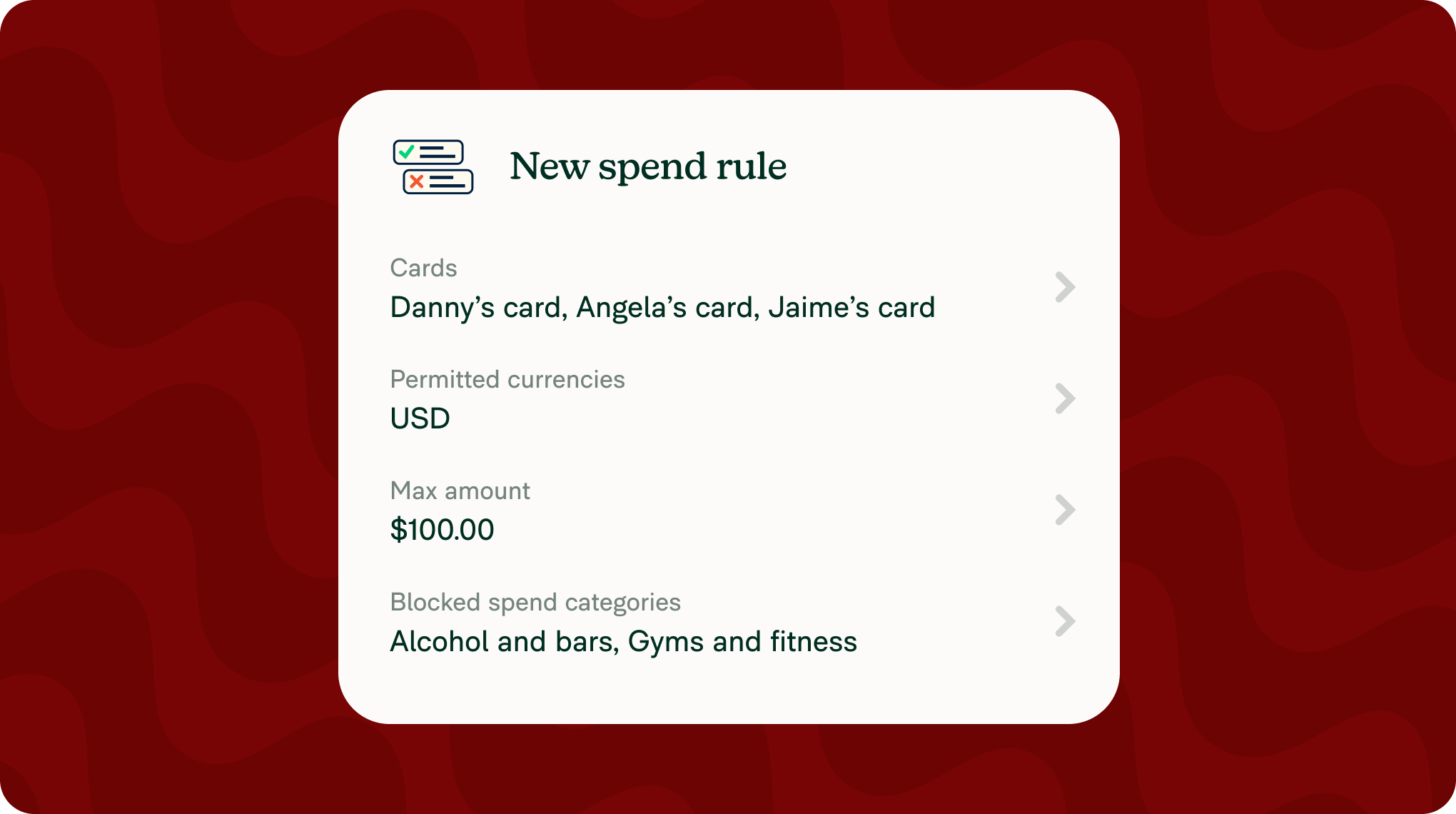
With the Expensify Card, admins can set spend rules that approve or decline transactions in realtime, before an expense is ever created. Build an allow list for tightly scoped cards or a block list for broadly-used ones, targeting specific merchants, spend categories, max amounts, or permitted currencies. Learn more about Expensify Card spend rules.
More updates this month
Here are a number of other improvements across AI, search, and day-to-day expense management:
New integrations: Expensify now connects to Gusto and TriNet. When you hire, update, or offboard an employee in either platform, Expensify stays in step automatically. Learn how to connect integrations.
Prohibited expense detection: Receipt scanning now automatically flags gift card and prepaid card purchases alongside alcohol, gambling, and tobacco. Learn how to set up prohibited expenses.
Automatic VAT tracking: SmartScan now reads VAT amounts directly from receipts. Learn how to enable taxes on a workspace.
Home page updates: Find recent transactions from all your imported credit cards and see which expenses need attention before you submit, without digging through reports. Learn more about how to navigate the home page in your workspace.
New filter experience: Redesigned filters make it faster to find what you're looking for across the app. Learn how to apply filters.
Workspace rooms directory: Now, you can see all rooms in your workspace in one place. Learn more about the workspace rooms directory.
Device management: Admins can now manage member devices from the admin panel. Learn how to view or revoke devices.
A smarter Concierge, tighter card controls, and an AI connection that actually saves time. There's less friction in your way this month, especially if you're one of the people who make it all add up. We’ll be back with more next month.
— Concierge